TRACES portal login: deductor with TAN, taxpayer with PAN, PAO with AIN
How to log in to the rebuilt TDS portal as a deductor, a taxpayer or a PAO, how to register, what to do about a forgotten password, how Form 16 and challan status work, where FY 2025-26 sits now, and the new form numbers.
TRACES login is at traces.tdscpc.gov.in. Deductors log in with their TAN as the user ID, taxpayers with their PAN and Pay and Accounts Offices (PAOs) with their AIN, followed by the password and the verification code on screen. TDS work for FY 2025-26 and earlier is under the menu “Compliance under Income Tax Act, 1961”.
TRACES (TDS Reconciliation Analysis and Correction Enabling System) is the Income Tax Department’s TDS portal, run by the Centralized Processing Cell for TDS (CPC-TDS). It was rebuilt for the Income-tax Act, 2025, which applies from 1 April 2026. The old address www.tdscpc.gov.in and the old login page now open the new site, the separate user ID has gone, and TDS statements can be filed online on TRACES itself. We checked every screen described here on the live portal on 23 October 2026, and the screenshots are from that day.
- Website: traces.tdscpc.gov.in (www.tdscpc.gov.in redirects there)
- User ID: TAN for deductors, PAN for taxpayers, AIN for PAOs
- Sub-users: enter the deductor’s TAN and choose “Yes” for sub-user login
- Form 26AS only: no TRACES password needed; go through the e-filing portal
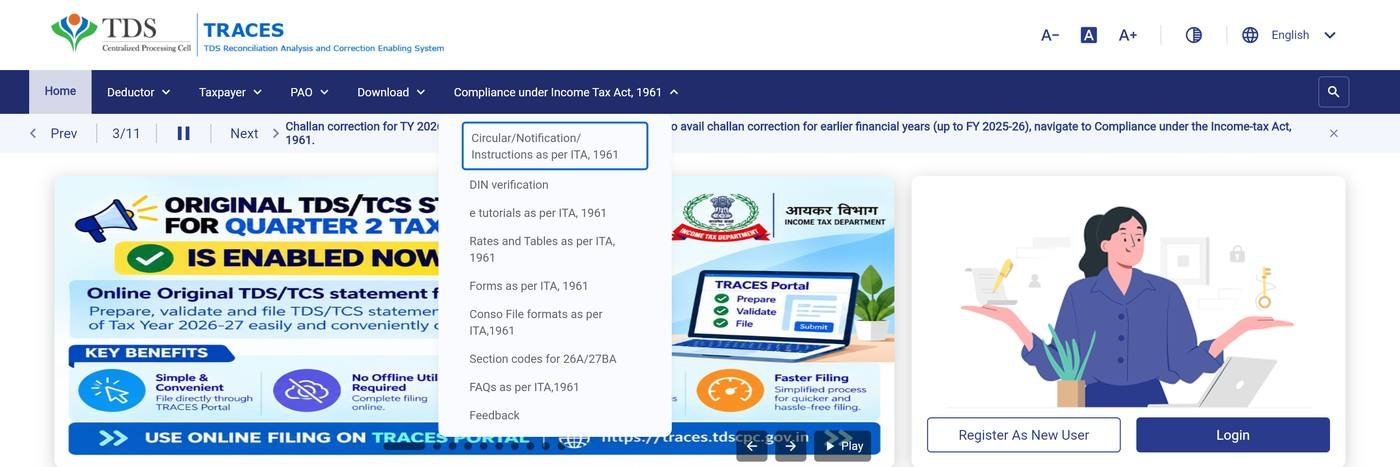
- FY 2025-26 and earlier: menu “Compliance under Income Tax Act, 1961”
- New: online filing of TDS/TCS statements in Forms 138, 140, 143 and 144
- Helpdesk: 1800 103 0344 (toll-free), 0120 481 4600, contactus@tdscpc.gov.in
What is the user ID for TRACES login?
The TRACES user ID is your TAN if you are a deductor, your PAN if you are a taxpayer and your AIN if you are a Pay and Accounts Office. The login screen has a tab for each, and the separate user ID of the old portal is no longer used. The portal’s own instructions on each tab read:
Taxpayer: “Use PAN as your User ID.”
PAO: “Use AIN as your User ID.”
| You are | User ID | Notes |
|---|---|---|
| Deductor (employer, business, bank) | TAN | Sub-users also enter the deductor’s TAN and answer “Yes” to “login as a sub-user?” |
| Taxpayer (the person whose tax was deducted) | PAN | Form 26AS and certificate checks also work through e-filing or net banking, without a TRACES password |
| Pay and Accounts Office (PAO) | AIN | Government offices that file Form 137 (earlier 24G) |
How to log in to TRACES as a deductor (TAN)
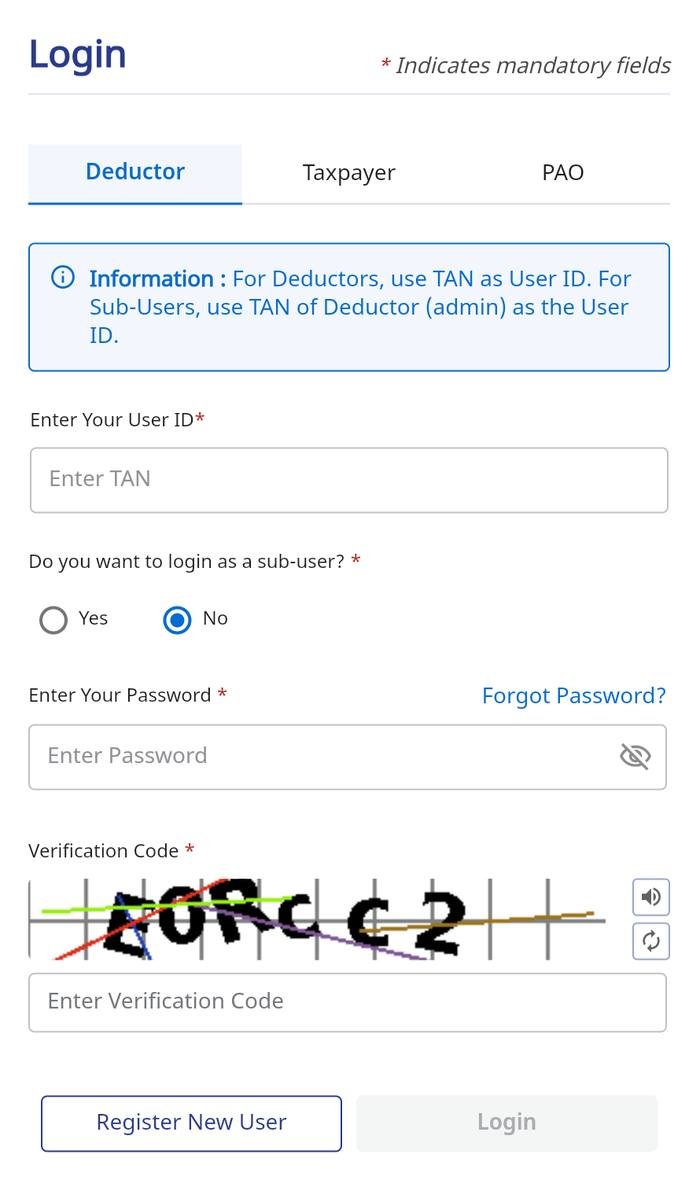
A deductor logs in to TRACES on the Deductor tab with the TAN as the user ID, then the password and the verification code. Step by step:
- Open the portal. Go to traces.tdscpc.gov.in and select Login.
- Choose the Deductor tab. Type your TAN in the Enter Your User ID box.
- Answer the sub-user question. Select No for the main (admin) account or Yes for a sub-user; a sub-user also enters the deductor's TAN.
- Enter password and code. Type the password and the verification code shown on screen; the speaker button reads the code aloud and the refresh button gives a new one.
- Log in. Select Login.
How to log in to TRACES with PAN (taxpayers)
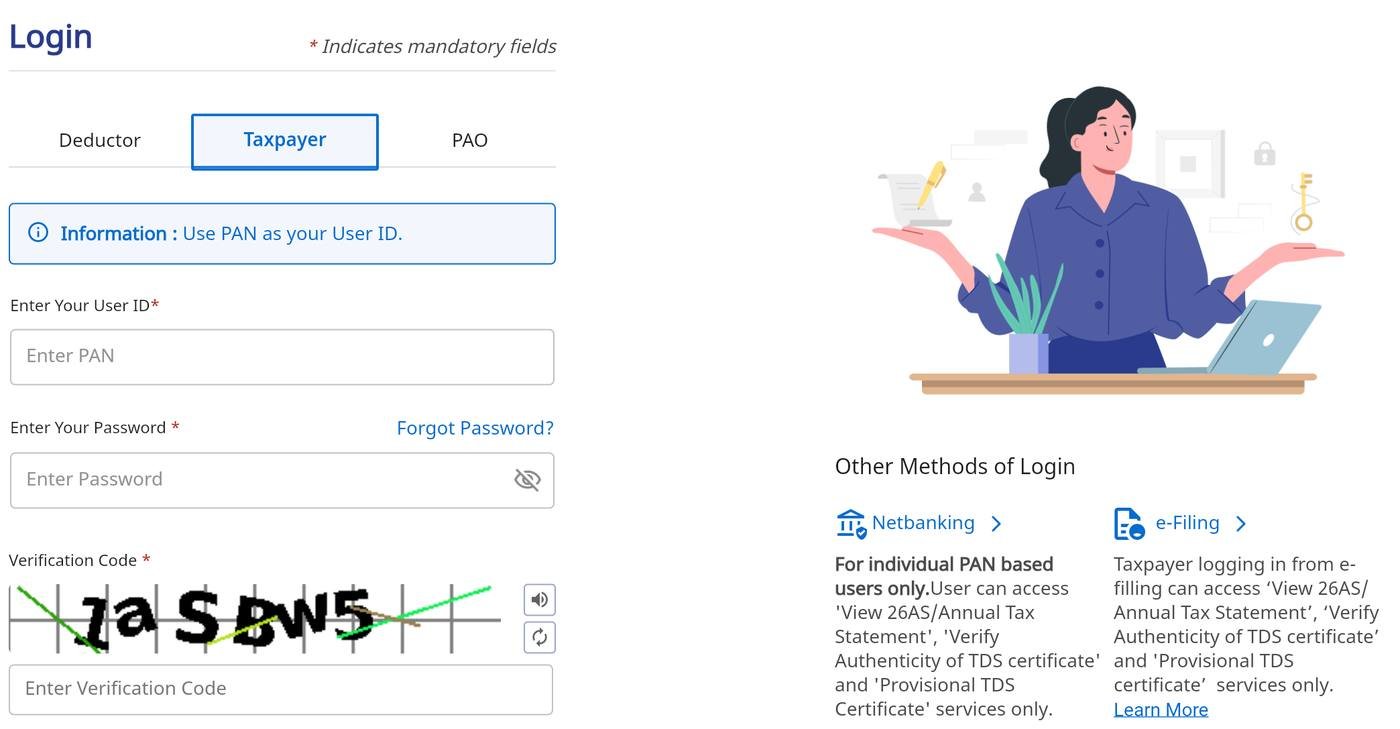
A taxpayer logs in to TRACES on the Taxpayer tab with the PAN as the user ID, the password and the verification code. For the three things most taxpayers want, a TRACES password is not needed at all. Viewing Form 26AS (the annual tax statement), verifying that a TDS certificate is genuine and getting a provisional TDS certificate also work through two other doors:
- The e-filing portal: log in at incometax.gov.in and open e-File → Income Tax Returns → View Form 26AS. The portal passes you to TRACES.
- Net banking: for individual PAN holders only, from your bank’s net-banking menu.
A taxpayer who buys property or pays high rent and deducts TDS with the PAN, through Form 141, is the deductor for that payment. The certificate for the seller or landlord (Form 132, earlier 16B, 16C, 16D or 16E) is requested on TRACES through this PAN login; the TRACES FAQ describes the buyer submitting the request for Form 16B.
How do PAOs log in to TRACES?
Pay and Accounts Offices log in to TRACES on the PAO tab with their AIN (Accounts Office Identification Number) as the user ID. The home page has an “Application for AIN allotment” service for offices that do not have one. A notice on the portal tells PAOs that Form 137, the successor to Form 24G, will be filed only through TRACES, and asks them to register now if they have not.
How to register on TRACES
To register on TRACES, select Register As New User, choose Deductor, Taxpayer or PAO, and fill in the details the portal asks for:
- Select Register As New User on the home page, or Register New User on the login screen.
- Choose Deductor, Taxpayer or PAO, and select Continue.
- Fill in the details the portal asks for and set a password. The Deductor and Taxpayer menus each have a “Guide to Registration” that walks through the screens.
If you registered earlier and the account has been deactivated, do not register again: the registration page has an “Activate Account” option for that. Deductors already registered on the old portal now log in with the TAN in the User ID box.
What if you forgot your TRACES password?
If you forgot your TRACES password, use Forgot Password? on the login screen, on the tab for your role. TRACES passwords also expire: the portal’s FAQ has a question on a password that was not changed within 180 days and expired, so change yours before that. If you are locked out entirely, call the TRACES helpdesk on 1800 103 0344.
What can you do on TRACES without logging in?
Several TRACES services are open on the home page without logging in. The Services panel lists:
- Verification Related Services, including PAN verification;
- Tax Calculator;
- View BIN Details, for tax paid by government offices through book entries;
- Raise and Track Grievance; and
- Report Account Misuse.
The public Download menu has the DSC Utility (for digital signatures), the PDF Generation Utility (for certificates) and the consolidated file formats under the 2025 Act.
How to download Form 16 or Form 130 from TRACES
Form 16 is downloaded from TRACES by the employer, not the employee. The deductor raises a request after logging in with the TAN. TDS-CPC generates the certificate from the processed quarterly statement, and the deductor can sign it digitally. The employer then gives it to the employee.
- Which form: Form 16 and 16A for FY 2025-26 and earlier, reached through the 1961 Act menu. From tax year 2026-27, Form 130 (salary) and Form 131 (other payments), which the portal lists under the Downloads menu.
- What TRACES produces: the TRACES FAQ says TDS-CPC provides Part A of Form 16, while Part B (the salary and tax computation) is issued by the employer.
- Tools: the PDF Generation Utility and the DSC Utility on the public Download menu. Deductors who struggle to generate many certificates are pointed to the latest utility, version 2.1 Beta.
- Employees: you cannot download your own Form 16 from TRACES. Your TDS shows in Form 26AS (through the e-filing portal), and the certificate comes from your employer.
How to check TDS challan status on TRACES
A deductor checks TDS challan status on TRACES after logging in with the TAN. The TRACES FAQ describes two ways to search:
- by the date range of deposit, with the status set to claimed, unclaimed or all; or
- by the BSR code, date of deposit, challan serial number and amount of one challan.
A challan shows as matched, unmatched (the TAN or challan details in the statement do not agree with the bank’s OLTAS record, fixed by a correction statement) or overbooked (more claimed against it than was paid). “View Challan Consumption Details” shows which deductee rows used a claimed challan. Challan correction for tax year 2026-27 is on the new screens; for earlier years it is under the 1961 Act menu.
What changed on the new TRACES portal?
The new TRACES changed the address, the user ID, the form numbers and where statements are filed:
| Old TRACES | New TRACES (2026) | |
|---|---|---|
| Address | www.tdscpc.gov.in (login page /app/login.xhtml) | traces.tdscpc.gov.in; both old addresses now open it |
| User ID | A user ID created at registration, entered with the TAN or PAN | The TAN, PAN or AIN itself |
| Filing TDS/TCS statements | Prepared offline and uploaded on the e-filing portal or at a TIN facilitation centre | Can also be prepared, validated and filed online on TRACES |
| Form numbers | 24Q, 26Q, 27Q, 27EQ; Form 16, 16A | 138, 140, 144, 143; Form 130, 131 (from tax year 2026-27) |
| FY 2025-26 and earlier | The whole site | The menu “Compliance under Income Tax Act, 1961” |
The portal’s notices also list what has moved online for tax year 2026-27:
- Statements: original and correction statements in Forms 138, 140, 143 and 144 can be prepared, validated and filed on TRACES, without the offline utility.
- Downloads: TDS certificates, default summaries, justification reports, consolidated (conso) files and PAN error reports for tax year 2026-27.
- Corrections: challans for TY 2026-27, and Schedules A, B, C and D (cash) of Form 141, with D (kind) to follow.
- Lower and nil deduction certificates: those for TY 2026-27 are issued under the Income-tax Act, 2025. Old sections such as 194A and 194J(b) are mapped to every matching new section.

Where is FY 2025-26 TDS work on the new TRACES?
TDS work for FY 2025-26 and earlier years is reached through the menu Compliance under Income Tax Act, 1961 on the new TRACES. Those years still fall under the 1961 Act, with the old form names (24Q, 26Q, Form 16 and so on). The portal says so for challan corrections. The menu holds the 1961-Act circulars, rates, forms, conso file formats, e-tutorials, FAQs and DIN verification.
Old and new TDS form numbers on TRACES
The Income-tax Rules, 2026 renumbered the TDS forms, and TRACES uses the new numbers from tax year 2026-27:
| Form | Up to FY 2025-26 | From tax year 2026-27 |
|---|---|---|
| Quarterly TDS statement, salary | 24Q | 138 |
| Quarterly TDS statement, other payments to residents | 26Q | 140 |
| Quarterly TDS statement, payments to non-residents | 27Q | 144 |
| Quarterly TCS statement | 27EQ | 143 |
| Statement by a Pay and Accounts Office | 24G | 137 |
| Challan-cum-statement: property, high rent, 194M, virtual digital assets | 26QB, 26QC, 26QD, 26QE | 141 |
| TDS certificate, salary | Form 16 | 130 |
| TDS certificate, other payments | Form 16A | 131 |
| TDS certificate for Form 141 deductions | 16B, 16C, 16D, 16E | 132 |
| TCS certificate | 27D | 133 |
So an employee’s certificate for FY 2025-26 is still Form 16, and the one for tax year 2026-27 will be Form 130. Both come from TRACES. The statement due dates are unchanged: 31 July, 31 October, 31 January and 31 May for the four quarters. The TDS payment guide covers depositing the tax, and the TDS rate chart the rates.
What is the TRACES helpline number?
The TRACES helpline number is 1800 103 0344 (toll-free), and the other number is 0120 481 4600. The email is contactus@tdscpc.gov.in. For return filing and e-Pay Tax, the e-filing helpdesk is 1800 103 0025.
The portal also warns of fake messages: “Official CPC (TDS) communications are sent only from the @tdscpc.gov.in domain. Never share passwords, OTPs, confidential, or personal information, nor click on suspicious links.”
TRACES लॉगिन कैसे करें
TRACES आयकर विभाग का TDS पोर्टल है, जिसका नया पता traces.tdscpc.gov.in है। नए पोर्टल पर डिडक्टर (कटौतीकर्ता) अपना TAN यूज़र आईडी के रूप में डालते हैं, करदाता अपना PAN और PAO अपना AIN। लॉगिन के लिए यूज़र आईडी, पासवर्ड और वेरिफ़िकेशन कोड भरें। सब-यूज़र भी डिडक्टर का TAN ही डालते हैं और “सब-यूज़र” के लिए “Yes” चुनते हैं। सिर्फ़ फ़ॉर्म 26AS देखना हो तो TRACES पासवर्ड की ज़रूरत नहीं: ई-फ़ाइलिंग पोर्टल पर लॉगिन करके e-File → Income Tax Returns → View Form 26AS खोलें। फ़ॉर्म 16 कर्मचारी नहीं, नियोक्ता TRACES से डाउनलोड करता है। वित्त वर्ष 2025-26 और उससे पहले का काम “Compliance under Income Tax Act, 1961” मेन्यू में होता है। हेल्पलाइन: 1800 103 0344।
Common questions
traces.tdscpc.gov.in. TRACES was rebuilt for the Income-tax Act, 2025, and the old address www.tdscpc.gov.in and the old login page now open the new site.
Deductors use their TAN, taxpayers their PAN and Pay and Accounts Offices their AIN. A deductor's sub-user also enters the deductor's TAN and selects Yes for sub-user login. The old portal's separate user ID is no longer used.
Yes, as a taxpayer: choose the Taxpayer tab and enter your PAN as the user ID with your password and the verification code. For Form 26AS, certificate verification or a provisional certificate you can instead log in to the e-filing portal or use net banking.
Select Register As New User, choose Deductor, Taxpayer or PAO and continue, then fill in the details the portal asks for. The Deductor and Taxpayer menus each have a Guide to Registration. If an old account was deactivated, use Activate Account on the registration page instead of registering again.
Use Forgot Password? on the login screen, on the tab for your role. TRACES passwords expire if they are not changed within 180 days, so change yours regularly. For other problems call the TRACES helpdesk on 1800 103 0344.
No. Form 16 is requested and downloaded on TRACES by the employer (the deductor) after logging in with the TAN; TDS-CPC generates Part A and the employer adds Part B. Employees see their TDS in Form 26AS through the e-filing portal.
Log in as a deductor and search either by a date range of deposit (claimed, unclaimed or all challans) or by the BSR code, date of deposit, challan serial number and amount. A challan shows as matched, unmatched or overbooked.
The old addresses, www.tdscpc.gov.in and its login page, now open the new portal at traces.tdscpc.gov.in. Work for FY 2025-26 and earlier is done there under the menu Compliance under Income Tax Act, 1961.
Yes. Original and correction statements in Forms 138, 140, 143 and 144, which replace 24Q, 26Q, 27EQ and 27Q from tax year 2026-27, can be prepared, validated and filed online on TRACES.
Yes. Certificates for FY 2025-26 are still Form 16 and Form 16A under the 1961 Act. From tax year 2026-27 they are Form 130 for salary and Form 131 for other payments, also generated on TRACES.
1800 103 0344 (toll-free) and 0120 481 4600. The email is contactus@tdscpc.gov.in.
Official CPC (TDS) emails come only from the @tdscpc.gov.in domain. Never share your password or OTP, and do not click links in unexpected messages.
- TRACES (TDS CPC) — home page, notices and login (traces.tdscpc.gov.in)
- TRACES — Contact Us
- TRACES — FAQs
- TRACES FAQ — Form 16 / 16A (generation, Part A and Part B)
- TRACES FAQ — challan status
- TRACES FAQ — taxpayer: Form 16B
- Income Tax Department — Form No. 138 (Earlier Form No. 24Q)
- Income Tax Department — Form 130 FAQs
- Income Tax Department — Form 131 FAQs
- TaxGuru — New TDS Forms 138 and 140 replace 24Q and 26Q from FY 2026-27
The login screens, menus, services, notices and contact details were read on the live TRACES portal on 23 October 2026. The portal changes often, so check its notices before relying on a date. Certificate and challan procedures follow the TRACES FAQs, and the new form numbers the Income Tax Department’s form documents. This is an independent guide, not a government website: log in only at traces.tdscpc.gov.in.