TDS payment online: how to pay TDS on the e-filing portal, step by step (tax year 2026-27)
Every screen of e-Pay Tax under the Income-tax Act, 2025 — the Act and year to pick, the payment codes that replaced section numbers, the five payment modes and what they charge, the due dates, and a calculator for the interest if you are late.
TDS is paid online at incometax.gov.in through e-Pay Tax: log in with the TAN, choose the Income-tax Act, 2025 for tax year 2026-27, click New Payment, pick Pay TDS/TCS, enter the payment codes and amounts, generate the challan and pay by net banking, UPI, debit card, RTGS/NEFT or at a bank counter. The deposit is due by the 7th of the month after deduction (30 April for March), and a late deposit costs 1.5% a month or part of a month counted from the date of deduction, not from the due date. The page below walks through every screen, the codes that replaced section numbers on the new challan, the modes and their charges, and a calculator for the interest if you are late.
- Where: incometax.gov.in → e-File → e-Pay Tax, logged in with the TAN (or pre-login with TAN + OTP)
- Which Act: Income-tax Act, 2025 for deductions from 1 April 2026 (tax year 2026-27); the 1961 Act only for earlier years
- Challan: ITNS 281N takes up to 20 payment codes in one challan; the old ITNS 281 took one section
- Due date: 7th of the next month; March deductions by 30 April
- Late: 1.5% a month or part, from the date of deduction (Section 398, old 201(1A)); ₹200 a day for a late statement (Section 427, old 234E)
- Modes: net banking, debit card, UPI and cards via payment gateway, RTGS/NEFT, or cash up to ₹10,000 at a bank counter
- CRN is valid 15 days; the receipt’s CIN is what the quarterly statement quotes
Where TDS is paid: e-Pay Tax on the e-filing portal
Every step — creating the challan, paying it, downloading the receipt and pulling the challan file for the quarterly statement — happens on the Income Tax Department’s e-filing portal under e-Pay Tax. The department’s own FAQ puts it plainly: the entire process, “from generation of challan (CRN) to making payment and recording of the payment history is enabled through the e-Filing portal”. The old NSDL/OLTAS challan page is not part of the flow; if you still land there from a bookmark, come back to incometax.gov.in.
There are two entrances. Post-login (TAN user ID and password) gives you saved drafts, payment history, the CSI file download and the outstanding-demand tile. Pre-login (Quick Links on the homepage, TAN plus a mobile OTP) is enough for a one-off deposit but hides the demand tile. Either way a challan reference number (CRN) is mandatory: you cannot pay TDS by simply transferring money to a government account.
Before you start: TAN, the right Act, and the codes
You need a TAN — the ten-character deductor number, not a PAN. The one exception is tax deducted by individuals on property purchases, high rent, 194M payments and virtual digital assets, which is paid with the PAN through Form 141. You also need to know three things the challan will ask for.
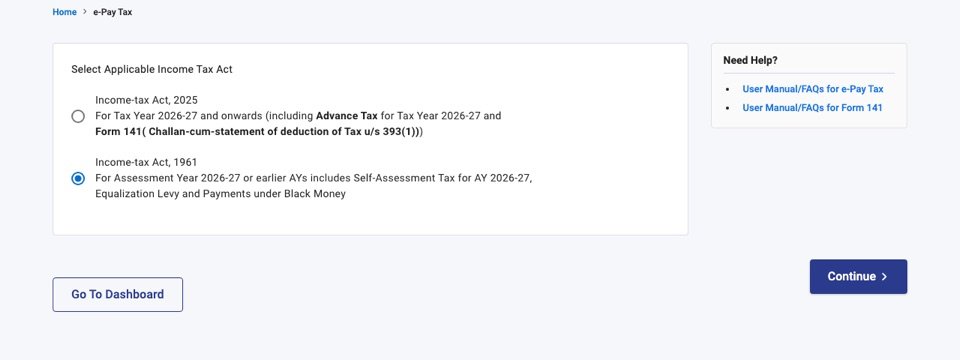
1. Which Act. The Income-tax Act, 2025 replaced the 1961 Act on 1 April 2026 and the portal now makes you choose. Tax deducted on or after 1 April 2026 belongs to tax year 2026-27 under the 2025 Act — “tax year” is the new name for the year in which the income arises, and the assessment-year label is gone for it. Anything for 31 March 2026 or earlier stays under the 1961 Act, labelled by assessment year (a February 2026 deduction is AY 2026-27). Picking the wrong Act produces a challan for the wrong year, and that is the single most common reason a challan fails to match a statement.
2. Major head and minor head. The major head describes the deductee: 0020 if the person you deducted from is a company, 0021 if not. The minor head describes why you are paying: 200 for tax you deducted and are depositing, 400 for a demand raised by TDS-CPC. Routine monthly deposits are always 200.
3. Payment codes instead of sections. The new challan, ITNS 281N, replaces section numbers with numeric payment codes, because the 2025 Act folded almost every TDS section into Section 393 (salary sits in Section 392). Your accountant, your software and the TDS rate chart still speak in 194C and 194J, so the portal’s dropdown shows both. The common ones:
| Code | Old section | Payment |
|---|---|---|
| 1001 | 192 (now 392) | Salary — government employees other than the Union government |
| 1002 | 192 (now 392) | Salary — all other employees |
| 1023 | 194C | Contractor payments when the contractor is an individual or HUF (1%) |
| 1024 | 194C | Contractor payments to any other contractor (2%) |
| 1026 | 194J(a) | Fees for technical services, call-centre services, film royalty (2%) |
| 1027 | 194J(b) | Professional fees, other royalty, non-compete fees (10%) |
| 1029 | 194 | Dividend (10%) |
| 1031 | 194Q | Purchase of goods above ₹50 lakh (0.1%) |
Under the 1961 Act a challan could carry only one section; under the 2025 Act one challan carries up to 20 codes for the same deductee type, so a small business can usually clear a whole month in one payment. The rates behind each code are on the rate chart, and the threshold changes of April 2025 are explained there too.
How to pay TDS online, step by step
- Log in with the TAN. Go to incometax.gov.in and sign in with the deductor’s TAN as the user ID. A TAN login is separate from the company’s PAN login; if the TAN has never been registered on the portal, register it first (it takes an OTP on the mobile number linked to the TAN). Payment without logging in is also possible: the pre-login e-Pay Tax link on the homepage asks for the TAN and a mobile OTP, but you lose the saved drafts, the payment history and the outstanding-demand tile.
- Open e-File → e-Pay Tax and pick the Act. The first screen asks which law the payment belongs to. Choose Income-tax Act, 2025 for tax deducted on or after 1 April 2026 (tax year 2026-27 onwards). Choose Income-tax Act, 1961 only for older years, described as assessment year 2026-27 or earlier — for example a March 2026 deduction being deposited late, or an old demand.
- Click New Payment and choose the Pay TDS/TCS tile. This is minor head 200, tax you deducted and are depositing on time or late. The other tiles are Pay Outstanding Demand (minor head 400, for a demand raised by TDS-CPC after processing a statement), Pay Fee (appeal fees and compounding) and Miscellaneous Receipts. Do not use the demand tile for a routine monthly deposit; a challan under the wrong minor head will not match your statement.
- Select the tax year and the deductee type. Pick tax year 2026-27, then the type and residential status of the people you deducted from. The major head follows from the deductee type: 0020 when the deductee is a company, 0021 when it is not. A company deducting from an individual contractor still uses 0021, because the head describes the deductee, not you.
- Add the payment codes and amounts. Under the 2025 Act the challan (ITNS 281N) takes up to 20 payment codes for the chosen deductee type, each with its own amount, so one challan can cover contractors, professional fees, rent and commission for the month. The codes are numeric and map to the familiar sections — the table above shows the common ones. Under the 1961 Act the old rule still applies: one section per challan.
- Fill the tax break-up. The Add Tax Breakup Details page splits the total into tax, surcharge, education cess, interest, penalty, fee under Section 427 (old 234E) and others. For a routine deposit everything goes under tax. If you are paying late, put the interest in the interest column of the same challan rather than a separate one; TDS-CPC reads it from there when it processes the statement.
- Generate the challan (CRN) and pay. Continue to create the challan reference number, then choose a payment mode: net banking of an authorised bank, debit card, a payment gateway for UPI and cards, RTGS/NEFT through a mandate form, or Pay at Bank Counter. A generated CRN stays valid for 15 days; unpaid, it expires and you generate a fresh one. The bank page completes the payment and returns you to the portal.
- Download the challan receipt. The receipt carries the challan identification number (CIN): the bank’s BSR code, the date of payment and the challan serial number. Keep it: the CIN, the amount and the date go into the quarterly statement, and the challan status turns PAID under Payment History on the e-Pay Tax page. A receipt you forgot to save is always available there.
Two habits save a lot of correction requests later. Pay each month’s TDS in the month it falls due rather than batching quarters, because interest runs from the date of deduction and a batched challan attracts it on every month inside it. And keep the deductee type honest: a challan under 0020 will not settle rows for individuals in the statement.
Payment modes, banks and charges
All five modes end in the same challan receipt; they differ in who can use them and what they cost.
| Mode | Who / which banks | Charges | Notes |
|---|---|---|---|
| Net banking | More than 30 authorised banks (SBI, HDFC, ICICI, Axis, Canara, PNB, Kotak, Union…) | None on the portal | Instant; status PAID in Payment History |
| Debit card | Canara Bank, ICICI Bank, Indian Bank, SBI, PNB, Union Bank | None | Instant |
| Payment gateway | UPI, credit card, debit card or net banking of any bank, through the Federal, Canara, Kotak, SBI, HDFC, Bank of Maharashtra, Bandhan or ICICI gateway | UPI and RuPay debit: nil · net banking ₹5–14 · credit card 0.85–1% — plus 18% GST on the charge | Instant |
| RTGS / NEFT | Any bank, using the mandate form generated with the CRN | Your bank’s transfer charges | Same day to next working day |
| Pay at bank counter | Branch of an authorised bank; cheque, demand draft or cash | None; cash capped at ₹10,000 per challan | Not open to companies or to anyone under tax audit (Section 63 of the 2025 Act, Rule 333) |
The gateway charges come from the portal’s own annexure and are levied by the gateway bank, not the department; they vary slightly by gateway (Federal Bank lists HDFC net banking at ₹12 and other banks at ₹5, Canara lists ₹14 and ₹6). UPI and RuPay debit cards are free everywhere, which makes UPI the cheapest route for a bank that is not on the net-banking list. Cheque and demand-draft payments at the counter are cleared before the challan turns PAID, so leave a working day or two before the due date.
After you pay: receipt, CIN, CSI file and Form 26AS
The challan receipt is the proof. Its CIN — the seven-digit BSR code of the bank, the date of deposit and a five-digit serial — is what the quarterly statement quotes against each deductee’s row, so the receipt matters more than the bank debit entry. If you closed the window too soon, the receipt is under Payment History on the e-Pay Tax page for as long as the TAN exists.
When you prepare the statement, the return-preparation utility asks for a CSI file (challan status inquiry): a small file listing every challan paid against the TAN, used to validate the challans you quote. The portal supplies it pre-login under Quick Links and post-login under the CSI File Download tab, for payments made through e-Pay Tax. Deductees do not see anything yet: their Form 26AS and AIS update only when TDS-CPC processes your quarterly statement, which is why a contractor asking “where is my TDS?” in May cannot be answered by the challan alone.
TDS payment due dates
| What | Due by | Notes |
|---|---|---|
| April to February deductions | 7th of the following month | Non-government deductors; e.g. May TDS by 7 June |
| March deductions | 30 April | Non-government deductors |
| Government deductor, paid by book entry | Same day | No challan; the PAO reports it in Form 24G |
| Government deductor, paid with a challan | 7th of the following month | Including March, by 7 April |
| Form 141 (old 26QB, 26QC, 26QD, 26QE) | 30 days from the end of the month of deduction | Property purchase, rent above ₹50,000 a month, 194M, virtual digital assets — paid with the PAN, no TAN |
| Quarterly statement 24Q / 26Q / 27Q | 31 July, 31 October, 31 January, 31 May | Q1 to Q4; the challan must be deposited before the statement can be filed |
| Form 16 / Form 16A | 15 June / 15 days after the statement due date | Certificates to employees and other deductees |
The statement dates are the ones that bite: the challan can be deposited on the 7th, but if the 26Q for the quarter goes in after 31 July the late fee runs regardless of how prompt the deposit was. Every date in the table sits on the tax calendar, worked out from today.
Late payment: interest, fee and penalty
Three separate charges apply, under three sections of the 2025 Act that most people still know by their 1961 numbers.
Interest, Section 398 (old 201(1A)). If you deducted but deposited late: 1.5% for every month or part of a month from the date of deduction to the date of deposit. If you failed to deduct at all: 1% a month from the date the tax was deductible to the date you finally deduct it, then 1.5% from there to the deposit. The phrase “month or part of a month” is counted the way TDS-CPC counts it, by calendar months touched: ₹50,000 deducted on 5 May and deposited on 10 June, three days after the 7 June due date, touches May and June, so the interest is 1.5% × 2 = 3%, or ₹1,500. Deposited on 30 June it would still be ₹1,500; deposited on 1 July it becomes ₹2,250. Interest is paid in the same challan under the interest head, before the statement is filed.
Late statement
Both figures follow the department’s own computation: interest by calendar months from the date of deduction, fee per day of delay capped at the tax deductible. Nothing you enter leaves your browser.
Late fee, Section 427 (old 234E). ₹200 for every day the quarterly statement is late, capped at the TDS amount in that statement. It is a fee, not a penalty: TDS-CPC levies it automatically when the statement is processed, and it must be paid before the statement is accepted.
Penalty, Section 461 (old 271H). ₹10,000 to ₹1,00,000 for not filing the statement or filing it with wrong details, at the assessing officer’s discretion. It is not levied if the statement is filed within one month of the due date with the tax, interest and fee paid. Two more consequences sit outside the TDS chapter: 30% of the expense is disallowed in your own income computation if the tax was not deducted or not deposited by your return due date, and failing to deposit deducted tax is a prosecutable offence — though since October 2024 prosecution is ruled out where the tax reaches the government by the statement’s due date.
Paying TDS without a TAN: Form 141 (old 26QB, 26QC, 26QD, 26QE)
Four deductions are designed for people who will never hold a TAN: buying property worth ₹50 lakh or more (1%), paying rent above ₹50,000 a month as an individual (2%), paying an individual contractor or professional more than ₹50 lakh in a year (2%), and paying for virtual digital assets. Each is paid with the buyer’s or tenant’s PAN through a challan-cum-statement: the payment and the return are the same form. Under the 2025 Act the four old forms are merged into Form 141, available on the same e-Pay Tax screen once you select the 2025 Act; the 1961-Act forms remain for earlier years. The deadline is 30 days from the end of the month of deduction, and the deductee gets Form 16B/16C/16D from TRACES within 15 days of that.
If you are the tenant, the rent threshold and the 2% rate are explained on the rate chart’s rent section; a landlord also charging GST on a commercial lease is a separate question, covered on the GST on rent page.
Checking status and correcting a challan
Status. On the portal, Payment History shows each CRN as Generated, Paid, Expired or, occasionally, “Incorrect details from Bank”, which clears once the bank’s confirmation is reconciled. The public challan status inquiry (by CIN or by TAN and period) confirms the same thing from the department’s side, and the CSI file is the machine-readable version of it.
Corrections. The portal’s Challan Correction service fixes the assessment year (within 7 days of deposit), the major head (within 30 days) and the minor head, once per challan — but only for PAN challans under minor heads 100, 300 and 400. A TDS challan under minor head 200 is corrected on TRACES (Statements / Payments → Request for OLTAS Challan Correction), which can move an unconsumed challan’s year, major head, minor head and section code. A challan paid by mistake cannot be refunded through the portal; the FAQ’s answer is to consume it against a later liability or apply to the jurisdictional assessing officer.
Six mistakes that cost money
- Wrong Act or year. An April 2026 deduction paid under the 1961 Act lands in AY 2026-27, and the tax-year 2026-27 statement cannot see it.
- Wrong deductee type. A challan under 0020 cannot settle rows for individuals or firms, and the mismatch surfaces only when the statement is processed.
- Minor head 400 for a routine deposit. The demand tile is for demands. The money is not lost, but the challan needs a correction before it matches.
- Counting interest from the due date. It runs from the date of deduction, in calendar months. One day late is two months’ interest.
- Batching the quarter into one challan. Legal, but every earlier month inside it carries interest, and the statement must split it row by row.
- Cash above ₹10,000 at the counter, or a company trying the counter at all: the bank will refuse, and the CRN expires in 15 days while you find another route.
After payment: filing the quarterly statement
Depositing the tax is half the job; the credit reaches the deductee only through the statement. Four times a year, prepare the statement in the return-preparation utility (or your payroll or accounting software), validate it against the CSI file, and upload it on the portal under e-File → Income Tax Forms → File TDS/TCS statements, signing with a digital signature or e-verifying. Salary goes in 24Q, other resident payments in 26Q, non-resident payments in 27Q. Once TDS-CPC processes it, download Form 16 or 16A from TRACES and issue it; employees will see the same figures on their salary slip and in Form 26AS. If you deducted under Section 192, the annual working behind the monthly figure is the one the income tax calculator runs.
Common questions
Log in to incometax.gov.in with the TAN, open e-File then e-Pay Tax, choose the Income-tax Act 2025 for tax year 2026-27, click New Payment and Pay TDS/TCS, select the tax year and deductee type, add the payment codes and amounts, generate the challan (CRN) and pay by net banking, UPI or card through the payment gateway, debit card, RTGS/NEFT, or at an authorised bank counter. Download the challan receipt; its CIN goes into the quarterly statement.
Yes, and for companies and anyone under tax audit it is the only way: Section 63 of the Income-tax Act 2025 with Rule 333 makes electronic payment mandatory for them. Others may also generate the challan online and pay cash (up to ₹10,000), cheque or demand draft at a branch of an authorised bank.
The 7th of the month following the deduction for April to February, and 30 April for tax deducted in March, for non-government deductors. Government offices paying by book entry deposit the same day; those paying with a challan have until the 7th of the next month, including for March. Form 141 (property, rent, 194M and virtual digital assets) is due within 30 days of the end of the month of deduction.
1.5 percent for every month or part of a month from the date of deduction to the date of deposit under Section 398 of the Income-tax Act 2025 (Section 201(1A) of the 1961 Act), counted in calendar months. ₹50,000 deducted on 5 May and paid on 10 June attracts two months, or ₹1,500. Failure to deduct at all costs 1 percent a month from the date the tax was deductible until it is deducted.
Only for the four PAN-based deductions: property purchases of ₹50 lakh or more, rent above ₹50,000 a month paid by an individual, payments above ₹50 lakh to contractors or professionals by an individual, and virtual digital assets. These use Form 141 under the 2025 Act (formerly Forms 26QB, 26QC, 26QD and 26QE). Every other deductor must obtain a TAN before deducting.
Yes. Choose the Payment Gateway mode on e-Pay Tax; it offers UPI, credit card, debit card and net banking of any bank. UPI and RuPay debit cards carry no charge; credit cards cost about 0.85 to 1 percent plus GST and net banking ₹5 to 14 plus GST, levied by the gateway bank.
Income-tax Act 2025 for tax deducted on or after 1 April 2026, which the portal labels tax year 2026-27 onwards. Income-tax Act 1961 for deductions up to 31 March 2026, labelled by assessment year (AY 2026-27 for financial year 2025-26) or earlier, and for old demands.
Post-login, open e-Pay Tax and the Payment History tab: each challan shows Generated, Paid or Expired with the CIN. Pre-login, the challan status inquiry on the portal confirms a CIN or lists the challans against a TAN for a period, and the CSI file gives the same list for the return-preparation utility.
Prepare the quarterly statement (24Q for salary, 26Q for other residents, 27Q for non-residents) in the return-preparation utility or your payroll software, validate it with the CSI file, then upload it under e-File, Income Tax Forms, File TDS/TCS statements on the e-filing portal and sign it digitally or e-verify. Due dates are 31 July, 31 October, 31 January and 31 May; a late statement costs ₹200 a day under Section 427.
- Income Tax Department — e-Pay Tax help and FAQ (e-filing portal)
- Income Tax Department — Challan creation through TAN login, user manual
- Income Tax Department — Tax payment modes under e-Pay Tax, with charges annexure
- Income Tax Department — Tax payment over the counter, user manual
- Income Tax Department — Challan correction request, FAQ
- Income Tax Department — Interest for delay in payment of TDS/TCS
- Income-tax Act, 2025 — Sections 392, 393, 398, 427 and 461 (India Code)
- TRACES (TDS-CPC) — statements, challan correction and certificates
Procedure, modes and charges verified against the e-filing portal's e-Pay Tax help pages and the pre-login Act-selection screen on 27 September 2026; interest, fee and penalty provisions verified against Sections 398, 427 and 461 of the Income-tax Act, 2025. Reviewed for technical accuracy by CA Amit Tripathi.