GST ARN status check: track your registration application and read each status
Where to check an ARN without logging in, what every status means in the portal’s own words, the 3, 7 and 30-day limits in the CGST Rules, how to answer a clarification notice, tracking with a TRN or SRN, what to do about a lost ARN, and a decoder that reads the ARN itself.
To check GST ARN status, open Services → Registration → Track Application Status on gst.gov.in (no login needed), enter the 15-character ARN and the captcha, and select SEARCH. The page shows the stage the application has reached, from Pending for Processing to Approved or Rejected, with the date and the officer’s remark for each step.
This guide covers where to check, what every status means in the portal’s own words, how long each route takes under the CGST Rules (including the three-working-day electronic grant that began on 1 November 2025), how to answer a clarification notice, how to find a lost ARN, how return and refund ARNs are tracked, and how to tell an ARN from a TRN or a GSTIN. We read the live portal and its user manual on 23 October 2026; the screenshots are from that day.
- Where: gst.gov.in → Services → Registration → Track Application Status (services.gst.gov.in/services/arnstatus), without logging in
- Enter: the ARN, 2 letters + 12 digits + 1 check character; or the SRN/FRN for MCA and IFSCA applications
- Statuses: Pending for Processing → (Site Verification, Pending for Clarification) → Approved, Rejected or Withdrawn
- How long: 3 working days (electronic grant, rules 9A and 14A), 7 working days (officer), 30 days (physical verification)
- Clarification notice: reply in Form GST REG-04 within 7 working days
- Unfinished application: track with the TRN after logging in; a TRN lasts 15 days
- By PAN, mobile or name: not possible for an application; Search by PAN lists GSTINs already granted
- Helpdesk: 1800-103-4786
What is a GST ARN (Application Reference Number)?
A GST ARN (Application Reference Number) is the 15-character acknowledgement number the GST portal generates when a form is submitted: a registration application, an amendment, a cancellation, a refund claim or a return. For a new registration it is issued when Part B of Form GST REG-01 is submitted, it is sent to the mobile number and email address given in Part A, and it is the only number you need until the GSTIN is issued. Many people search for the “ARN number”, though the N already stands for number. An ARN is not a GST number: the GSTIN exists only once the application is approved.
How do I check GST ARN status without logging in?
To track GST application status without logging in, use the portal’s Track Application Status page, which asks only for the ARN and a captcha. Step by step:
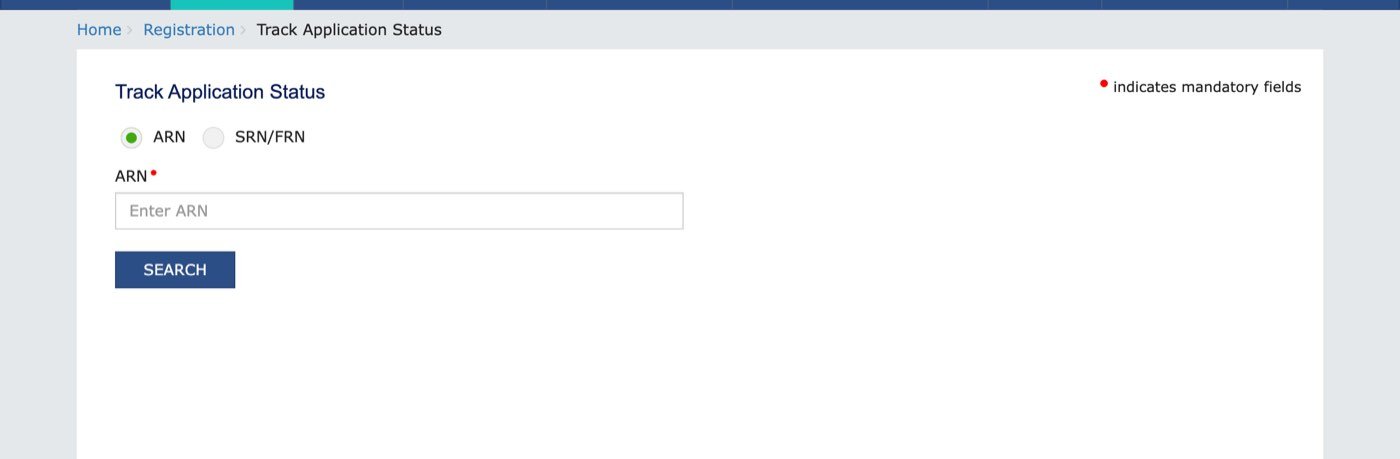
- Open the tracking page. On gst.gov.in choose Services, then Registration, then Track Application Status. The page is services.gst.gov.in/services/arnstatus and needs no login.
- Keep ARN selected. Choose SRN/FRN only if the application was made through the MCA (SPICe+) portal or the IFSCA portal.
- Type the ARN. Enter the 15-character ARN from the acknowledgement email or SMS. A captcha box appears once you start typing; enter the characters shown.
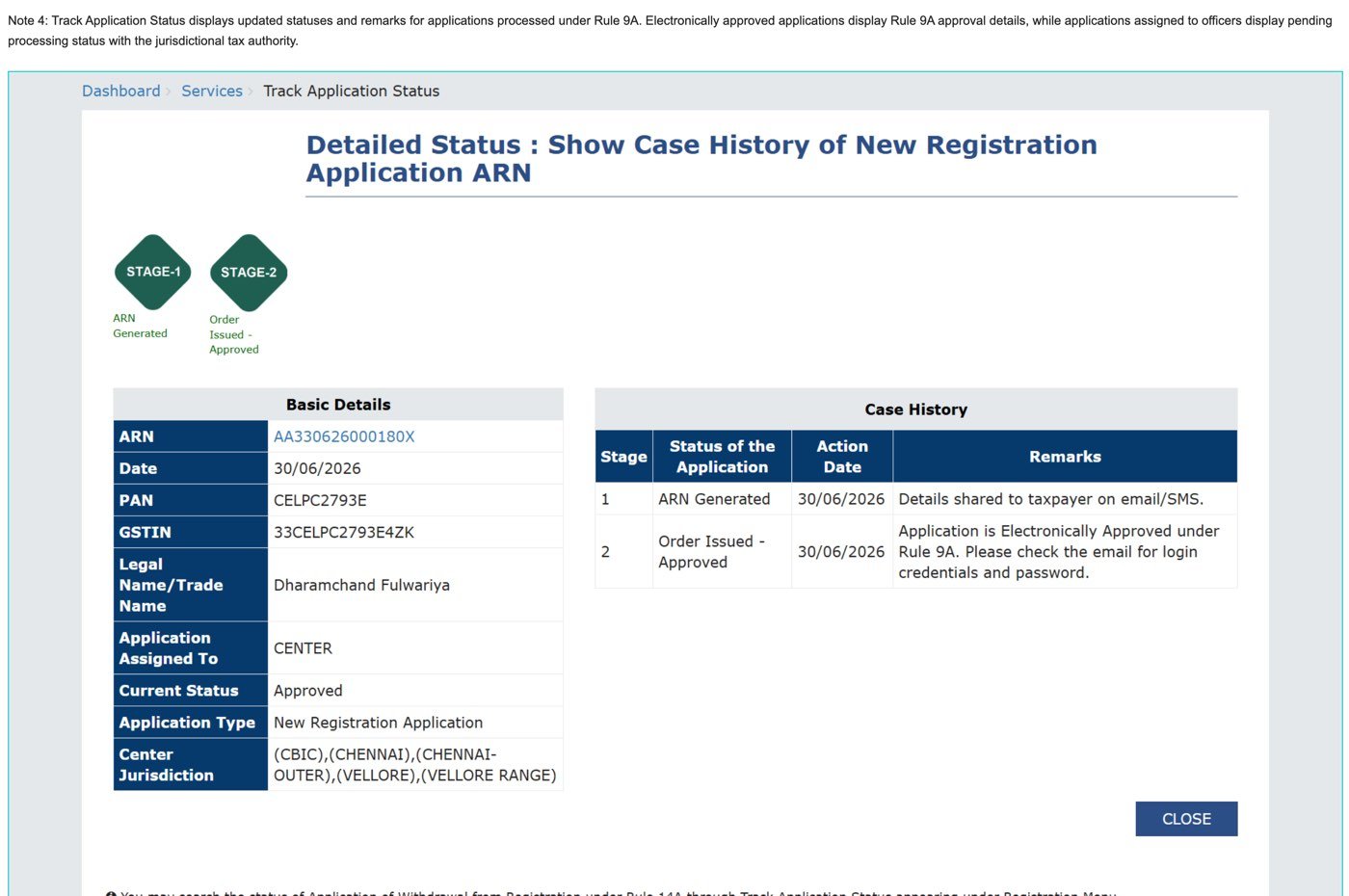
- Select SEARCH. The page shows the stages, the current status, the case history with dates and remarks, and a link to download the acknowledgement.
The result page has three parts: diamond-shaped stage markers (green up to the current stage, grey after it), a Basic Details box with the ARN, date of filing, PAN, legal name, which tax authority the application is assigned to and the current status, and a Case History table with the date and remark for every stage. Once approved, the GSTIN also appears in Basic Details. After logging in, the ARN on this screen is a link that downloads the acknowledgement as a PDF.
What do the characters in a GST ARN mean?
A GST ARN is 15 characters long: two letters, twelve digits and one check character. The portal’s form enforces exactly that. Its ARN box accepts at most 15 characters and the pattern below, read from the page’s own code on 23 October 2026:
([a-zA-Z]{2}[0-9]{12}[0-9a-zA-Z]{1}), maxlength=15. In words: two letters, twelve digits, then one letter or digit.GSTN has not published what the twelve digits stand for, but the dated samples in its own user manual read the same way. In the sample AA330626000180X, filed on 30/06/2026 and later given a GSTIN beginning 33, digits 3 and 4 are the state code (33, Tamil Nadu), digits 5 and 6 the month (06) and 7 and 8 the year (26) of submission, followed by a six-digit serial and the check character. Another sample, AA290426000142Q, is a Karnataka (29) application dated 19/04/2026. The decoder below reads an ARN that way. It checks the shape, names the state and month it implies, and tells a TRN or a GSTIN apart from an ARN. It cannot show the status: only the portal has that, and the portal asks for a captcha.
The decoder runs in your browser and sends nothing anywhere. A correct shape does not mean the application exists; a wrong shape almost always means a mistyped character, most often 0 for O or 1 for I. The state codes are the ones on our GST state code list.
What does each GST application status mean?
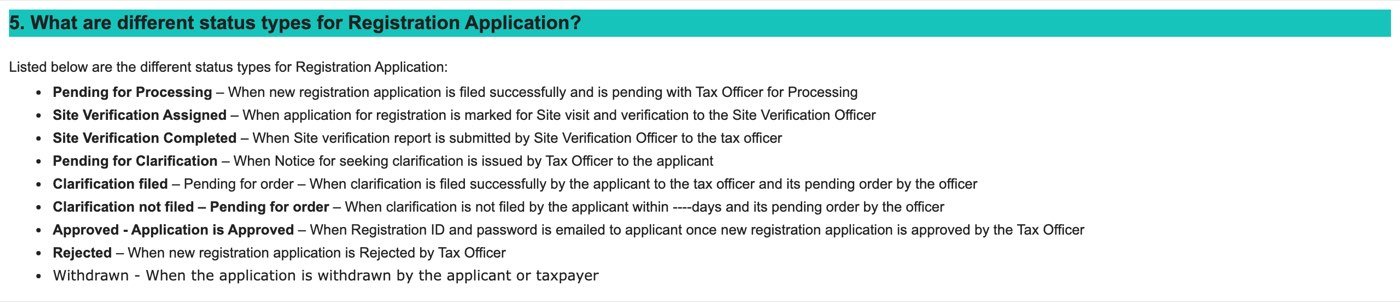
GST registration status on the portal runs from Pending for Processing, through Site Verification or Pending for Clarification if the officer needs more, to Approved, Rejected or Withdrawn. The portal’s user manual defines each one; the middle column quotes it, and the right column says what to do:
| Status | The manual’s wording | What it means for you |
|---|---|---|
| Pending for Processing | “filed successfully and is pending with Tax Officer for Processing” | Nothing to do yet. The officer has 7 working days from submission (30 days if the application is marked for physical verification or Aadhaar authentication was not done). A low-risk application can also be approved electronically within 3 working days under rule 9A. |
| Site Verification Assigned | “marked for Site visit and verification to the Site Verification Officer” | An officer will visit the principal place of business. Be there with the original documents. The report goes up in Form GST REG-30 within 15 working days of the visit, and the 30-day clock applies. |
| Site Verification Completed | “Site verification report is submitted by Site Verification Officer to the tax officer” | Wait for the order. The officer decides on the report and the documents. |
| Pending for Clarification | “Notice for seeking clarification is issued by Tax Officer to the applicant” | A notice in Form GST REG-03 is on the portal. Reply in Form GST REG-04 within 7 working days of receiving it, with the documents asked for. See how to reply. |
| Clarification filed – Pending for order | “clarification is filed successfully by the applicant to the tax officer and its pending order by the officer” | Your reply is in. The officer has 7 working days from receiving it to approve or reject. |
| Clarification not filed – Pending for order | “clarification is not filed by the applicant within ----days” (the manual leaves the number blank; the rule says 7 working days) | The reply window has passed. The officer may reject the application in Form GST REG-05. Check whether the portal still lets you file the clarification, and do it at once. |
| Approved | “Registration ID and password is emailed to applicant once new registration application is approved by the Tax Officer” | The GSTIN is assigned and shown on the detailed status page. Log in with the emailed credentials and download the certificate, Form GST REG-06. No email? See approved but no email. |
| Order Issued – Approved (rule 9A or 14A) | “Application is Electronically Approved under Rule 9A. Please check the email for login credentials and password.” | Same as Approved, but granted by the portal itself without an officer, within 3 working days. The remark names rule 9A or rule 14A. |
| Rejected | “new registration application is Rejected by Tax Officer” | The rejection order, Form GST REG-05, must record the reasons in writing. Read them before applying again. |
| Withdrawn | “the application is withdrawn by the applicant or taxpayer” | The detailed status shows only two stages. Nothing is pending. |
How long does GST registration take after the ARN?
GST registration is granted within 3 working days of submission when the portal approves it electronically (rules 9A and 14A, from 1 November 2025), within 7 working days when a tax officer approves it (rule 9), and within 30 days when the place of business has to be physically verified. The clocks in the CGST Rules, 2017:
| Route | Who | Time limit | Rule |
|---|---|---|---|
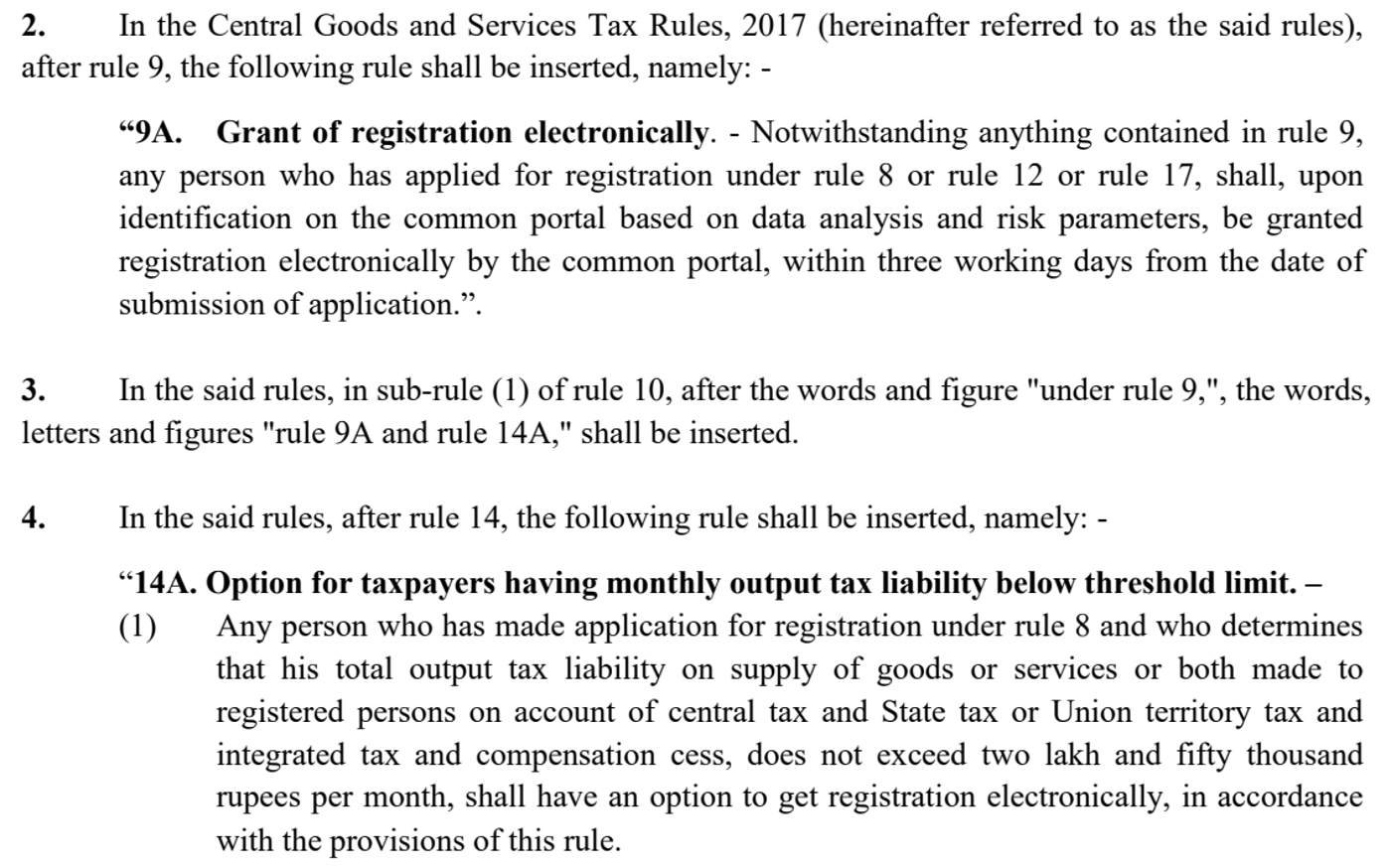
| Electronic grant (risk-based) | Applicants under rules 8, 12 or 17 whom the portal identifies “based on data analysis and risk parameters” | 3 working days from submission | Rule 9A, from 1 Nov 2025 |
| Simplified option for small B2B suppliers | Output tax on supplies to registered persons up to ₹2.5 lakh a month, Aadhaar authenticated, option ticked in Form GST REG-01 | 3 working days from submission | Rule 14A, from 1 Nov 2025 |
| Officer approval | Everyone else, with Aadhaar authentication done | 7 working days from submission | Rule 9(1) |
| Physical verification | No Aadhaar authentication, flagged for verification after authentication, or the officer decides a visit is needed | 30 days from submission, after the visit | Rule 9(1) proviso, rule 25 |
| Clarification notice | Officer finds the application deficient | Notice (REG-03) within 7 working days, or 30 days in the verification cases; reply (REG-04) within 7 working days of the notice; decision within 7 working days of the reply | Rule 9(2), 9(3) |
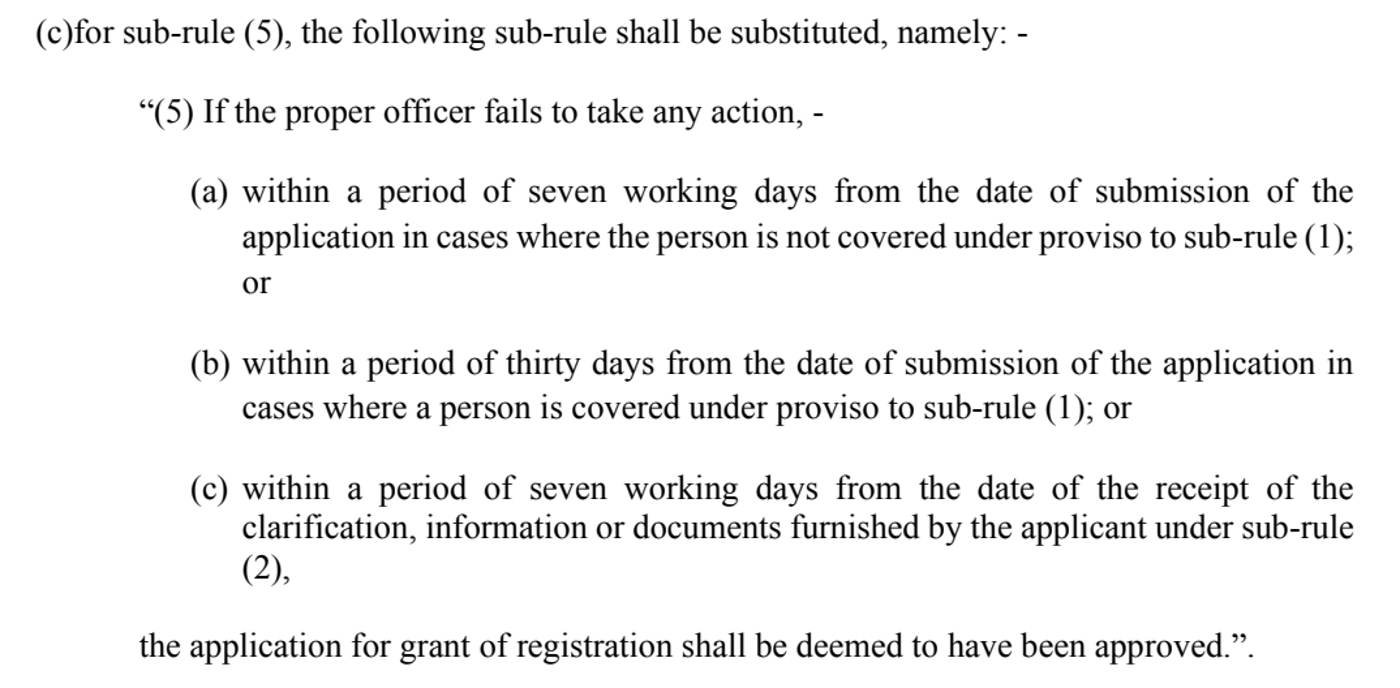
| Deemed approval | Officer takes no action within the period that applies | Registration “shall be deemed to have been approved” | Rule 9(5) |
Rule 9A, inserted by Notification 18/2025-Central Tax, reads:
An application the portal does not pick for electronic grant goes to an officer under rule 9. Notification 94/2020-Central Tax set the officer’s periods at seven working days, or thirty days where Aadhaar authentication was not done or the officer decides to verify the premises:
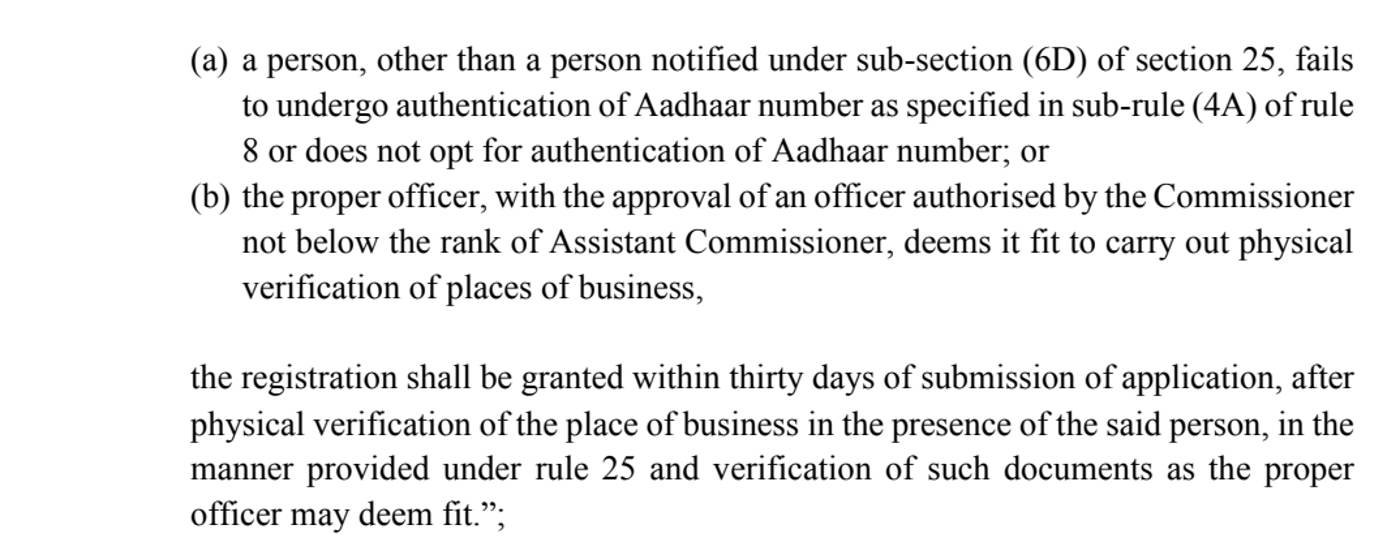
“Working days” excludes weekends and the office’s holidays, so seven working days is about nine to eleven calendar days. If the officer does nothing within the period, rule 9(5) says the application “shall be deemed to have been approved”:
What should I do if the status is “Pending for Clarification”?
“Pending for Clarification” means the tax officer has issued a notice in Form GST REG-03 asking for more information or documents, and you must reply in Form GST REG-04 within seven working days of receiving it. Rule 9(2) sets both deadlines: the officer’s notice within seven working days of submission (thirty in the verification cases), and your reply within seven working days of the notice. To file the reply, the portal manual’s steps are:
- On gst.gov.in select REGISTER, choose Temporary Reference Number (TRN), enter the TRN, your email address and the captcha, and continue with the OTP (valid 10 minutes).
- On the Application for Filing Clarifications page, enter the reference number of the notice or the ARN and select SEARCH.
- Choose whether to modify the application. “Open fields with queries raised through REG-03” edits only what the officer questioned; “Open all allowed fields” lets you change everything the form allows.
- Answer each query, upload the documents and submit with the digital signature or EVC.
Read the notice on the portal, not only the SMS: it lists the exact fields and documents. A clarification cannot change the PAN, the state, or the mobile number and email given in Part A (the explanation to rule 9(2)). After you submit, the status moves to “Clarification filed – Pending for order” and the officer has seven working days to decide; silence after that is deemed approval. If you miss the deadline the status reads “Clarification not filed – Pending for order”, and rule 9(4) lets the officer reject the application in Form GST REG-05.
How do I track GST registration with a TRN, SRN or FRN?
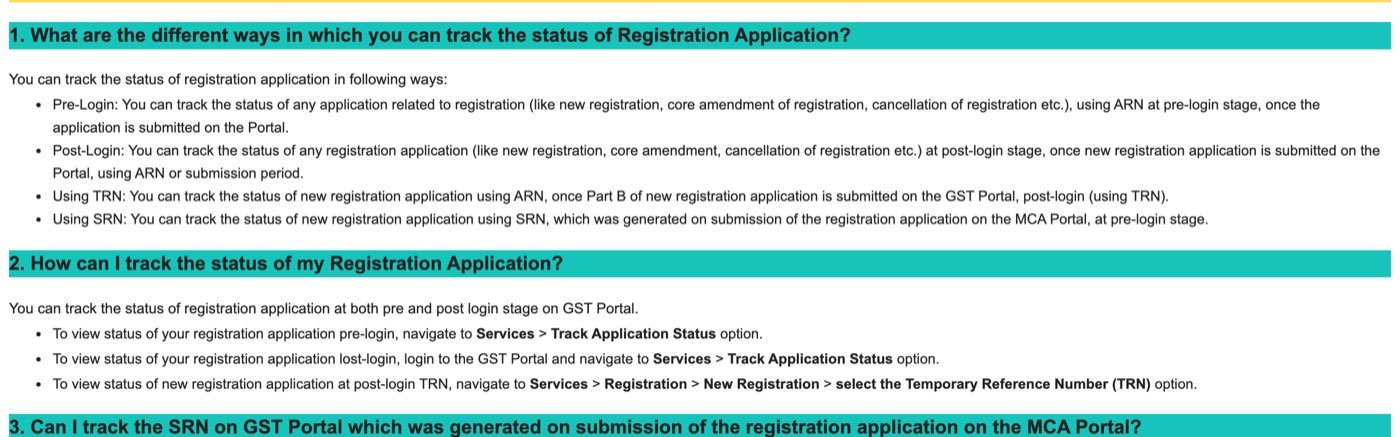
A TRN tracks a registration application that has not been submitted yet, after logging in with it; an SRN or FRN tracks an application that was made on the MCA or IFSCA portal, without logging in. The manual lists four ways to track:
- Pre-login with the ARN: any registration application (new registration, core amendment, cancellation) once it is submitted.
- Post-login with the ARN or a submission period: Services → Track Application Status after logging in.
- With the TRN: Services → Registration → New Registration → Temporary Reference Number. The TRN is the 15-digit number you get after Part A (PAN, mobile and email verified by OTP). It lasts 15 days; if Part B is not submitted in that time the draft is purged and you start again. The ARN exists only after Part B is submitted.
- With the SRN or FRN, pre-login: choose SRN/FRN on the tracking page. The SRN is the Service Request Number from the MCA portal when a company applies for GST through SPICe+, and the FRN is the Financial Reference Number from the IFSCA portal. The result shows the certificate-of-incorporation stage and then the GST ARN, which you can open.
Can I check GST ARN status by PAN, mobile number or name?
No. The GST portal has no ARN status check by PAN, mobile number or name: the Track Application Status page accepts only an ARN or an SRN/FRN. A GST status check by PAN does exist, but it answers a different question. Search Taxpayer → Search by PAN (services.gst.gov.in/services/searchtpbypan) lists the GSTINs already registered against a PAN, so it shows a granted registration, not a pending application. If you have lost the ARN:
- Search your email and SMS for “ARN”. The acknowledgement went to the mobile number and email address given in Part A of the application.
- Log in with the TRN. Services → Registration → New Registration → Temporary Reference Number shows the submitted application with its ARN and status; the manual lists this as one of the four ways to track.
- Ask whoever filed for you. A professional who submitted the application received the same acknowledgement.
How do I check GST application status after logging in?
After logging in to gst.gov.in, GST application status is under Services → Track Application Status, where you pick the Registration module and search by ARN, by SRN/FRN or by a submission period. The manual notes that this post-login screen is not available to first-time applicants, who have no login yet; they use the pre-login page. Searching by submission period lists every application filed in that window with its ARN and a Download link for each acknowledgement. The same screen tracks amendment and cancellation applications, and withdrawals from the rule 14A option.
Approved but no email or GSTIN?
If the status is Approved but the credentials have not arrived, the Track Application Status page itself can resend them: search the ARN again and select the click here link on the detailed status page, which sends the first-time login details by email and SMS once more. The manual describes this under Note 5 of the pre-login steps. Three other things to check:
- The GSTIN is already on the status page. Once approved, Basic Details shows it. It is 15 characters: your state code, your PAN, an entity code and a checksum (rule 10(1)). The GSTIN decoder validates one.
- The certificate is online, not posted. Rule 10 says the certificate in Form GST REG-06 “shall be made available to the applicant on the common portal”. After the first login, the manual’s path is Services → User Services → View or Download Certificates, then Download.
- The effective date may be earlier than the approval date. Rule 10(2): if you applied within 30 days of becoming liable, registration runs from the date you became liable; later than that, from the date of grant.
What happens if the application is rejected or withdrawn?
A rejected GST application gets an order in Form GST REG-05, and rule 9(4) requires the officer to record the reasons in writing: no reply to the notice, or a reply the officer is not satisfied with. The status page shows Rejected and the case history carries the order date. Read the reasons on the portal before applying afresh, and fix what was questioned. A Withdrawn status means you withdrew the application; the stage strip shows only two stages, and nothing is pending.
Does the ARN also track GST returns, refunds and payments?
Yes. Every form submitted on the GST portal gets its own ARN, and returns and refunds have their own tracking screens, separate from the registration page:
- Returns: after logging in, Services → Returns → Track Return Status. Choose the financial year, then search by the return’s ARN, by the filing period or by status. The manual lists four return statuses: “TO BE FILED” (due but not filed), “SUBMITTED BUT NOT FILED” (validated, filing pending), “FILED – VALID” and “FILED – INVALID” (filed but tax not paid or short paid).
- Refunds: after logging in, Services → Refunds → Track Application Status with the Module set to Refund, by filing year or by the refund ARN; the ARN link downloads the refund ARN receipt. Without logging in, services.gst.gov.in/services/trackstatus offers the same Module choice between Refunds and Registration.
- Payments: a challan is followed on the separate Track Payment Status page under Services → Payments.
ARN vs TRN vs GSTIN: which number is which?
An ARN tracks an application, a TRN is the temporary login for an unfinished application, and a GSTIN is the registration number issued once the application is approved:
| Number | Shape | When you get it | What it is for |
|---|---|---|---|
| ARN (Application Reference Number) | 15 characters: 2 letters, 12 digits, 1 check character (AA330626000180X) | When Part B of the application is submitted | Tracking the application until it is decided |
| TRN (Temporary Reference Number) | 15 digits | After Part A (PAN, mobile and email verified by OTP); valid for 15 days | Completing Part B and filing a clarification before the GSTIN exists |
| SRN (Service Request Number) / FRN | Issued by the MCA portal (SPICe+) or the IFSCA portal | When the company or IFSC application is submitted there | Tracking a registration that started outside gst.gov.in |
| GSTIN | 15 characters: 2 for the state code, 10 for the PAN, 2 for the entity code, 1 checksum (rule 10) | On approval, with the certificate in Form GST REG-06 | Everything after registration: invoices, returns, Search Taxpayer |
The GST portal has a separate Search Taxpayer service for GSTINs. The ARN page is only for applications. Once you have a GSTIN, the GST calculator, the rate list and the return calendar take over.
Who do I call about a stuck ARN?
The GST portal helpdesk number is 1800-103-4786, shown in the footer of the tracking page, and complaints are logged on the Grievance Redressal Portal for GST (the “Log/Track Your Issue” link in the same footer). Before calling, check the dates in the case history against the timelines above: an application inside its seven or thirty days is not stuck, and one past them is deemed approved under rule 9(5), which is worth saying when you call. For the jurisdictional officer, the Basic Details box names the Centre or State jurisdiction the application is assigned to.
GST ARN स्टेटस कैसे चेक करें
GST ARN (एप्लिकेशन रेफ़रेंस नंबर) वह 15 अक्षरों का नंबर है जो रजिस्ट्रेशन का आवेदन जमा करने पर ईमेल और SMS से मिलता है। स्टेटस देखने के लिए gst.gov.in पर Services → Registration → Track Application Status खोलें, लॉगिन की ज़रूरत नहीं। ARN और कैप्चा भरकर SEARCH दबाएँ। पेज पर हर स्टेज की तारीख और अधिकारी की टिप्पणी दिखती है। “Pending for Processing” का मतलब है कि आवेदन अधिकारी के पास है; “Pending for Clarification” का मतलब है कि नोटिस (REG-03) आया है और 7 कार्यदिवसों में REG-04 में जवाब देना है; “Approved” पर GSTIN और लॉगिन ईमेल से मिलते हैं। 1 नवंबर 2025 से कम जोखिम वाले आवेदन 3 कार्यदिवसों में अपने-आप मंज़ूर हो सकते हैं (नियम 9A); अधिकारी के पास 7 कार्यदिवस होते हैं, और जगह की जाँच होने पर 30 दिन। आवेदन अधूरा हो तो TRN से लॉगिन करके देखें। हेल्पलाइन: 1800-103-4786।
Common questions
The ARN (Application Reference Number, often called the ARN number) is the 15-character number the GST portal generates when an application for registration, amendment or cancellation is submitted. It has two letters, twelve digits and a check character, arrives by email and SMS, and is used to track the application until the GSTIN is issued.
No. Track Application Status accepts only an ARN or an SRN/FRN. Search Taxpayer, Search by PAN on gst.gov.in lists the GSTINs already registered against a PAN, which tells you about a granted registration, not a pending application.
Search your email and SMS for ARN: the acknowledgement was sent to the mobile number and email given in Part A of the application. Or log in with the TRN under Services, Registration, New Registration, Temporary Reference Number, where the submitted application and its status are shown.
No. A return's ARN is tracked after logging in under Services, Returns, Track Return Status, by ARN, filing period or status. A refund ARN is tracked under Services, Refunds, Track Application Status with the Module set to Refund, or without logging in at services.gst.gov.in/services/trackstatus.
On gst.gov.in choose Services, Registration, Track Application Status (services.gst.gov.in/services/arnstatus). Keep ARN selected, type the 15-character ARN and the captcha, and select SEARCH. The page shows the stages, the current status and a case history with dates and remarks.
Three working days when the portal grants it electronically (rules 9A and 14A, from 1 November 2025), seven working days when a tax officer approves it (rule 9), and up to thirty days when the place of business is physically verified or Aadhaar authentication was not done. If the officer takes no action within the period, the application is deemed approved.
The application has been filed successfully and is waiting with the tax officer. Nothing is needed from you. The officer has seven working days from submission, or thirty days in the physical-verification cases.
The officer has issued a notice in Form GST REG-03 asking for information or documents. Reply in Form GST REG-04 within seven working days of receiving the notice: log in with the TRN, open Application for Filing Clarifications, enter the notice reference or the ARN, answer the queries and submit. The officer then has seven working days to decide.
The application has been marked for a visit to the place of business by a site verification officer. The visit is done in your presence, the report is uploaded in Form GST REG-30 within fifteen working days of the visit, and the registration must be decided within thirty days of submission.
Search the ARN again on Track Application Status and select the click here link on the detailed status page: it resends the first-time login details by email and SMS. The GSTIN is already shown in Basic Details, and the certificate (Form GST REG-06) is downloaded after the first login under Services, User Services, View or Download Certificates.
Yes, after logging in with it: Services, Registration, New Registration, then the Temporary Reference Number option. The TRN is the 15-digit number issued after Part A and is valid for fifteen days. The ARN exists only once Part B is submitted.
The SRN is the Service Request Number from the MCA portal when a company applies for GST through SPICe+, and the FRN is the Financial Reference Number from the IFSCA portal. Choose SRN/FRN on the tracking page to follow those applications without logging in.
A TRN (15 digits, valid fifteen days) is the temporary login for an application that is not yet submitted. An ARN (2 letters, 12 digits, 1 check character) tracks the submitted application. A GSTIN (state code, PAN, entity code and checksum) is the registration number issued when the application is approved.
Rule 9(5) of the CGST Rules: if the proper officer takes no action within seven working days of submission (thirty days in the physical-verification cases, or seven working days after receiving your clarification), the application is deemed to have been approved.
1800-103-4786, the GST portal helpdesk shown on the tracking page. Issues can also be logged on the Grievance Redressal Portal for GST linked from the same page.
- GST portal — Track Application Status (pre-login)
- GST portal — Track Application Status with Module choice Refunds / Registration (pre-login)
- GST portal — Search Taxpayer by PAN
- GST portal user manual — Track Return Status (manual) and its FAQ with the four return statuses
- GST portal user manual — Track Refund Status (Post-Login)
- GST portal user manual — FAQs > Track Application Status (status types, ways to track)
- GST portal user manual — Track Application Status (Pre-Login), including resending login credentials
- GST portal user manual — Track Application Status (Post-Login), SRN/FRN, submission period, rule 9A and 14A remarks
- GST portal user manual — Application for Filing Clarification
- GST portal user manual — registration walkthrough (15-digit TRN, purged after 15 days)
- GST portal user manual — Download Registration Certificate
- CBIC tax repository — CGST Rules, 2017, rules 8, 9, 10 and 25 (consolidated text with amendments)
- Notification 94/2020-Central Tax, 22 December 2020 (seven working days, thirty days, deemed approval)
- Notification 18/2025-Central Tax, 31 October 2025 (rules 9A and 14A), ICAI’s copy
- GST Council newsletter, October 2025 (summary of Notification 18/2025)
- e-Invoice portal — master codes (state codes)
The tracking page, its input rules and the user manual were read on the live GST portal on 23 October 2026. The time limits are from the CGST Rules, 2017 as amended up to Notification 18/2025-Central Tax; the later rule amendments of 2025 and 2026 (Notifications 20/2025, 01/2026, 02/2026) do not touch registration. The ARN layout in the decoder is GSTN practice read from the samples in its manual, not a published rule. This is an independent guide, not a government website: check status only at gst.gov.in.